HappyKeywords for Mac · Top earners
See which apps earn, in every country and category.
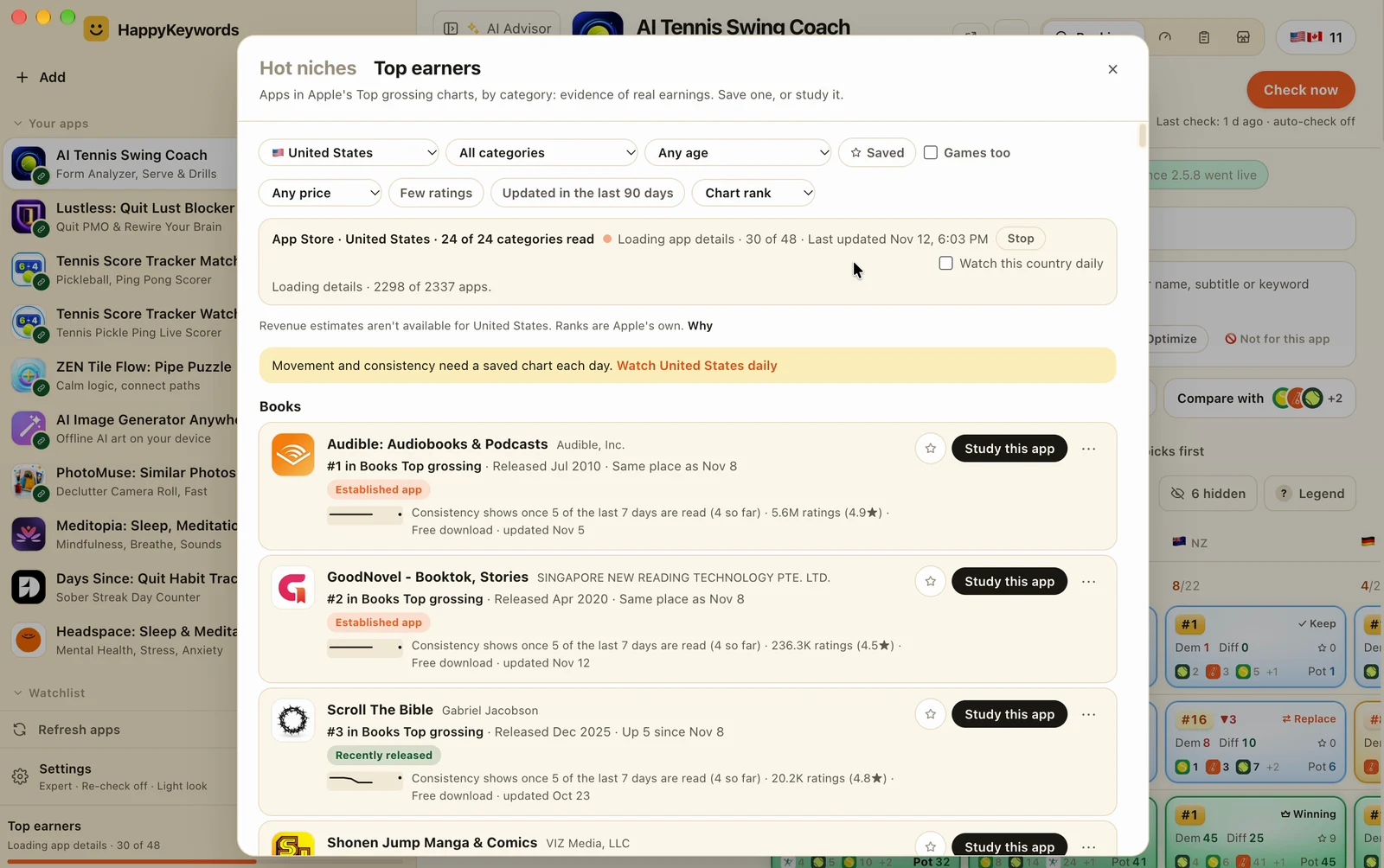
Top earners shows the apps in Apple's Top grossing charts for a country, by category: each app's place, when it came out, and how it moved since your last saved day.
Lifetime license for 2 Macs, every update included. Full refund any time before 1.0.
What it does
Apple's Top grossing charts
By country and category, each app's place in its own chart, from Apple's public charts.
Old and new apps
See when each app came out, and filter by release date to find recent ones.
How they moved
Each app's movement since your last saved day, and in Expert, a rank line over time.
Keywords to win
Study an app, or find the keywords where it's in the top 10 and you're not.
How it works
- 1Press + Add, then Top earners.
- 2Pick a country and a category, and filter by release date.
- 3Save apps for later, study one, or find its keywords where you're not in the top 10.
Questions
- Does it show revenue numbers?
- No. It shows Apple's public Top grossing ranks, not made-up revenue numbers.
- Does it use AI requests?
- No. It reads Apple's public charts only: no AI requests and no App Store searches.
- Is it included in the price?
- Yes. Every feature is included in the one-time license, with every update.